
MAGI2 Open Weights Status: Preview (114B) vs Flagship (480B)
Sand AI has built MAGI2 around an open-research roadmap rather than a closed black-box silo, split across two major milestones in 2026:
- MAGI-2 Preview (
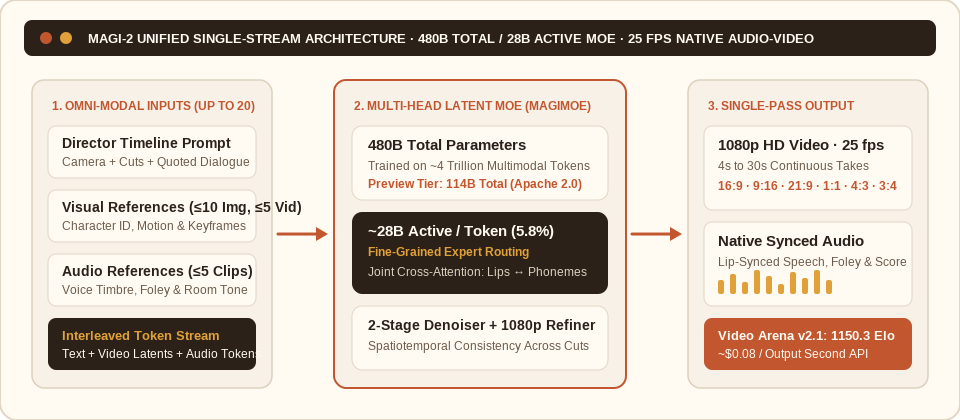
sand-ai/MAGI-2-previewon Hugging Face): Released on August 5, 2026 under the permissive Apache 2.0 license, complete with model weights and two-stage inference code. It features ~114 billion total parameters using Multi-Head Latent Mixture-of-Experts (MagiMoE), activating roughly 6 billion parameters per token. - MAGI2 Flagship (480B Total / ~28B Active): Officially unveiled on November 24, 2026, scaling the single-stream unified audio-video architecture 4× to 480 billion total parameters (~5.8% active sparsity) trained on ~4 trillion tokens, pushing Artificial Analysis Video Arena v2.1 performance from 998.5 Elo to 1150.3 Elo, with open-source weight releases announced to follow the flagship launch.
For enterprise studios, visual effects houses, and developer platforms, Apache 2.0 licensing on MAGI-2-preview permits commercial deployment, custom LoRA/expert fine-tuning, and strict air-gapped VPC execution without sending unreleased storyboards to third-party servers.
Why MoE Sparsity Saves Compute—But Still Demands Multi-GPU VRAM
The single most frequent hardware question around MAGI2 open weights is: "If MAGI-2 Preview only activates 6B parameters per token (or 28B on Flagship), why can't it run smoothly on a single 24GB or 32GB consumer RTX card?"
In a Mixture-of-Experts Transformer, every video patch and audio token dynamically routes to different expert sub-networks at each layer:
- Compute (FLOPs) Scales with Active Parameters: Matrix multiplications per step touch only ~6B (Preview) or ~28B (Flagship) parameters, keeping generation latency practical even at 1080p 25fps.
- Memory Capacity Scales with Total Parameters: Because any expert might be selected on the very next token across thousands of spatiotemporal patches, all 114B or 480B parameters must stay accessible in pooled GPU HBM (or stream across ultra-high-bandwidth NVLink / PCIe Gen5 offloads, which severely bottlenecks frame denoising speed).
- Two-Stage Denoiser + 1080p Refiner Overhead: Official
sand-ai/MAGI-2-previewpipelines pair a base audio-video denoiser with a dedicated high-definition 1080p refiner stage, requiring additional VRAM headroom for intermediate video latents and multimodal KV caches.
Verified Multi-GPU Hardware Tiers for MAGI2 Deployment
| Model Tier & Precision | Approx. Pooled Memory Needed | Recommended Production Node | Deployment Notes |
|---|---|---|---|
| MAGI-2 Preview (114B) · BF16 | ~260 GB+ (Weights + Refiner) | 8× NVIDIA H100 80GB (or 4× H200) | Official reference setup for full-speed 2-stage 1080p audio-video inference. |
| MAGI-2 Preview (114B) · FP8 | ~148 GB (Weights + Buffers) | 4× H100 80GB / 2× H200 141GB | Native Hopper FP8 tensor cores cut memory nearly in half with minimal Elo loss. |
| MAGI2 Flagship (480B) · FP8 | ~530 GB+ | 8× NVIDIA H200 141GB (1.1 TB HBM3e) | Fits entire 480B expert pool + 30s 1080p latent sequence on a single 8-GPU HGX node. |
| Single Workstation GPU (24–32GB) | Exceeds single-card VRAM | Use Cloud API (~$0.08/s) | Offloading 114B–480B weights over system RAM makes iterative video denoising impractical. |
Running Inference with vLLM-Omni and Tensor Parallelism
Community and enterprise deployments commonly serve sand-ai/MAGI-2-preview via vLLM-Omni recipes using Tensor Parallelism (TP=4 or TP=8) across NVLink-connected Hopper GPUs:
- Shard Experts Evenly Across NVLink: Expert Parallelism (EP) combined with Tensor Parallelism avoids cross-node PCIe bottlenecks during token routing.
- Pin Audio & Video Tokenizers on Rank 0: Keep VAE video decoding and audio waveform detokenization pre-warmed so cold-start latency only occurs once at container boot.
- Benchmark API vs Self-Hosting Cost Before Provisioning: Before renting dedicated 8× H100 instances, compare cluster hourly rates against $0.08/sec MAGI2 pricing for your monthly clip volume, and draft test shots with the MAGI2 prompt generator or back on the MAGI2 overview.